
Last checked: [August 25, 2026]

How this guide was prepared:
[First-hand visit / Booking experience / Official-source research]
Quick Answer
Calling a taxi in Korea is easy, even if you do not speak Korean. For most international travelers, the simplest options are k.ride and Uber.

Before requesting a taxi, check the route on NAVER Map. Compare the taxi estimate with the subway or bus route, then decide whether the time and convenience are worth the cost.

You may also have heard people call the service “Kakao Taxi.” Koreans generally use an app called Kakao T, but international travelers should look for k.ride instead. k.ride is Kakao Mobility’s global ride-hailing app, powered by the Kakao T platform and designed to make registration, destination searches, communication, and payment easier for overseas visitors.
At a Glance
| Whay You Need | Recommended Option |
|---|---|
| Best first app for international travelers | k.ride |
| Familiar alternative | Uber |
| Route and fare comparison | NAVER Map |
| Street taxi availability sign | “빈차”, meaning “vacant” |
| Useful Korean phrase | “네비대로 가주세요” (Naebi-daero gajuseyo) meaning “Please follow the navigation” |
Check NAVER Map Before Calling a Taxi
Before opening a taxi app, search for your destination on NAVER Map.
NAVER Map can show public transportation routes and an expected fare, making it easier to compare a taxi with the subway or bus.
Check these four things:
| Check | What to Consider |
|---|---|
| Travel time | Does a taxi save a meaningful amount of time? |
| Estimated fare | Is the cost reasonable when divided among your group? |
| Transfers | Does public transportation require several transfers? |
| Walking distance | Will you have to walk far with luggage? |
A taxi can be a good choice when:
- You have heavy luggage.
- Two to four people are traveling together.
- It is raining heavily.
- The public transportation route requires several transfers.
- You are traveling late at night.
- Your destination is far from the nearest subway station.
NAVER Map is especially useful because you can also copy the Korean name or address of your destination from the place page.
New to the app? Read our guide on how to use NAVER Map in Korea first.
Heard of “Kakao Taxi”? Download k.ride
Many travel guides and online posts use the name “Kakao Taxi.”
The domestic app commonly used in Korea is Kakao T. However, international visitors should start with k.ride, Kakao Mobility’s global app connected to the Kakao T taxi platform.
They are not the exact same app. k.ride is the separate international app designed for global travelers.
With k.ride, you can:
- Sign up by authenticating your mobile device or linking a social account.
- Search for destinations in your preferred language.
- Communicate with the driver through automatic translation.
- Check an estimated fare before requesting a taxi.
- Register a credit or debit card.
- Use supported mobile payment methods.
- Track the assigned taxi in the app.
The k.ride interface is available in English, Japanese, Simplified Chinese, and Traditional Chinese. Its destination search and automatic driver chat support a much wider range of languages.
Important: Do not search only for “Kakao Taxi” in the app store. Search for k.ride and confirm that the developer is Kakao Mobility Corp.
Kakao T may still work for some overseas users, but k.ride is the easier starting point because its registration, language, communication, and payment features are built around international travelers.
Uber Is a Familiar Alternative
Uber is a good alternative if you already have an account and payment method registered.
In Korea, Uber connects passengers with licensed local taxi drivers rather than private drivers. You can enter your pickup point and destination, view an estimated fare, track the taxi, confirm the vehicle information, and follow the journey in real time.
In Seoul, Uber also allows users to add a card to their account or select an in-person payment option for eligible rides, paying the driver by cash or card at the end.
My recommendation is:
- Try k.ride first because it is designed for global travelers using Kakao Mobility’s Korean taxi platform.
- Keep Uber as a familiar backup, especially if you already use it in your home country.
No taxi app guarantees immediate dispatch. If one app cannot find a driver, try the other.
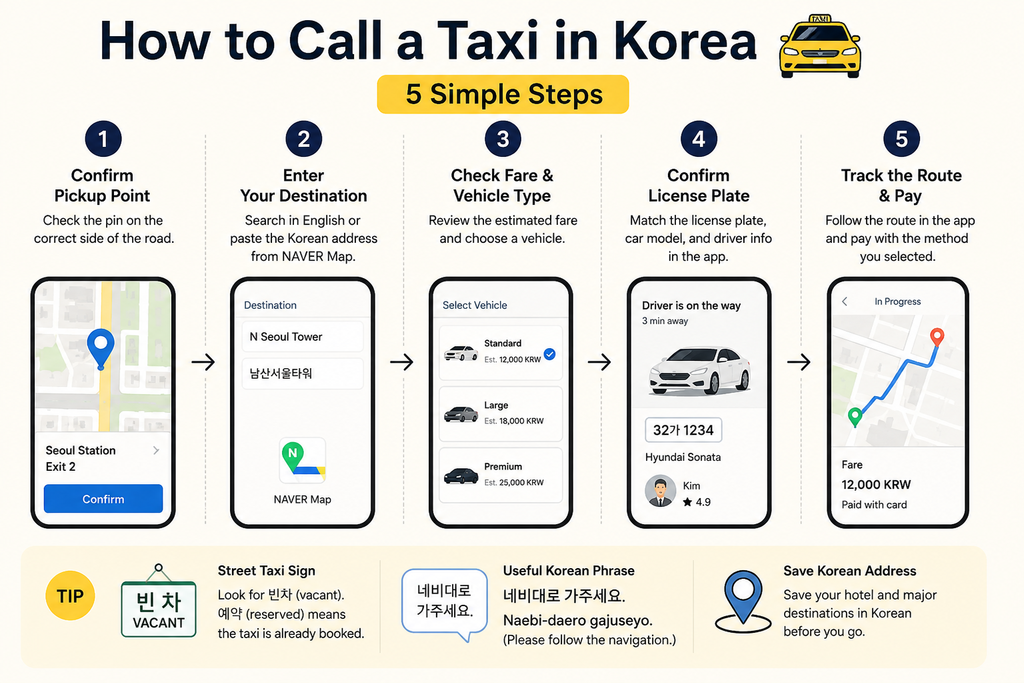
How to Call a Taxi in Five Steps
Step 1: Confirm Your Pickup Point
Check whether the pickup pin is in the correct location.
This is especially important at:
- Large subway stations
- Shopping malls and department stores
- Airports
- Hotels with several entrances
- Narrow streets
- Wide roads with barriers in the middle
Make sure the pin is on the same side of the road where you are waiting. A driver may not be able to make a U-turn or stop across a large road.
Step 2: Enter Your Destination
Search for your destination in English first.
If the correct place does not appear, open NAVER Map and copy its Korean name or address. Paste the Korean text into k.ride or Uber.
You do not need to know how to type Korean.
Step 3: Check the Fare and Vehicle Type
Review the estimated fare before requesting the taxi.
For most trips, choose the regular or standard taxi option. Larger vehicles, premium cars, and faster dispatch options may cost more.
If you are carrying several large suitcases, check whether the selected vehicle has enough luggage space.
Step 4: Confirm the License Plate
When the taxi arrives, compare the actual vehicle with the information in the app.
Check:
- The license plate number
- The vehicle model or color
- The driver information
Do not get into a taxi simply because it is the same color. Several similar taxis may arrive at the same pickup point.
Step 5: Follow the Route and Pay
You can follow the journey in the app.
At the end of the ride, pay using the method selected when you requested the taxi. If you selected automatic app payment, make sure you do not pay the driver a second time.
Treat the estimated fare as a guide. The final amount may change because of waiting time, tolls, added stops, destination changes, or significant changes to the journey.
Can You Hail a Taxi on the Street?
Yes. You can still hail a taxi from the roadside or use a designated taxi stand.
Look at the sign displayed on the taxi:
- 빈차 — Vacant
- 예약 — Reserved
In Seoul, the vacant sign is generally shown in red, while the reserved sign is generally shown in green.
If you hail a taxi without using an app, prepare the Korean name and address of your destination. Many drivers may not be comfortable speaking English, so showing the address on your phone is easier than trying to explain it verbally.
You can show the driver the place page directly in NAVER Map.
Local Taxi Tips
Save Your Hotel Address in Korean
Save the Korean name and full address of your hotel before going out.
This is useful if:
- Your phone battery is running low.
- The English hotel name does not appear.
- You hail a taxi on the street.
- Your hotel has several branches.
- The driver asks for a nearby landmark.
A screenshot of the NAVER Map place page can also help.
Check Which Side of the Road You Are On
A pickup point that looks close on the map may actually be across a wide road.
Before requesting the ride, zoom in and confirm:
- Your side of the road
- The building entrance
- A nearby store or landmark
- Whether taxis can legally stop there
Confirm the Plate, Not Just the Color
Korean taxis often have similar colors and vehicle models.
Always match the license plate shown in the app with the actual taxi before getting in.
Use This Korean Phrase
네비대로 가주세요.
Romanization:
Naebi-daero gajuseyo.
Meaning:
Please follow the navigation.
Use this phrase if the driver asks which route you prefer and you are not sure.
It does not sound like an accusation. It is a polite way to say that you do not know the area well and would like the driver to follow the navigation system.
You can simply show this sentence on your phone:
네비대로 가주세요.
Please follow the navigation.
FAQs
Should I Download Kakao T or k.ride?
For most international travelers, start with k.ride.
Kakao T is the domestic app commonly used by Koreans. k.ride is Kakao Mobility’s separate global app, designed with easier sign-up, multilingual destination searches, translated driver communication, and card or mobile-payment registration for overseas users.
Can I Pay with a Foreign Credit Card?
k.ride allows users to register credit or debit cards and supported mobile-payment methods. Card acceptance can still depend on the card issuer, so register and test your payment method before you need a taxi.
Uber also supports registered card payments. In Seoul, eligible rides may offer an in-person payment option using cash or a card at the end of the trip.
Do I Need to Speak Korean?
Not necessarily.
When you request a taxi through an app, the destination is sent directly to the driver. k.ride also provides automatic translation for driver chat.
Still, saving the Korean name and address of your destination is strongly recommended.
Can I Request a Taxi Late at Night?
Yes. Taxi apps can be used late at night, although actual availability depends on your location and demand.
Check the estimated fare before confirming the ride and allow extra time in busy nightlife districts, near major stations, or after large events.
Final Checklist
Before taking a taxi in Korea:
- Check the route on NAVER Map.
- Compare public transportation with the estimated taxi fare.
- Use k.ride or Uber if a taxi is the better option.
- Confirm that the pickup pin is on the correct side of the road.
- Save the Korean destination name and address.
- Match the license plate before getting in.
- Say “Naebi-daero gajuseyo” if you want the driver to follow the navigation.
Calling a taxi in Korea is simple once you have the right apps.
Check the route on NAVER Map first, request your taxi through k.ride or Uber, and confirm the license plate before getting in.
If you have heard of “Kakao Taxi,” remember the app name intended for international travelers:
k.ride.
Information may change after publication. Check the latest route, fare, opening hours, booking, and payment conditions before traveling.