Last checked: [August, 2026]

How this guide was prepared:
[First-hand visit / Booking experience / Official-source research]
Quick Answer
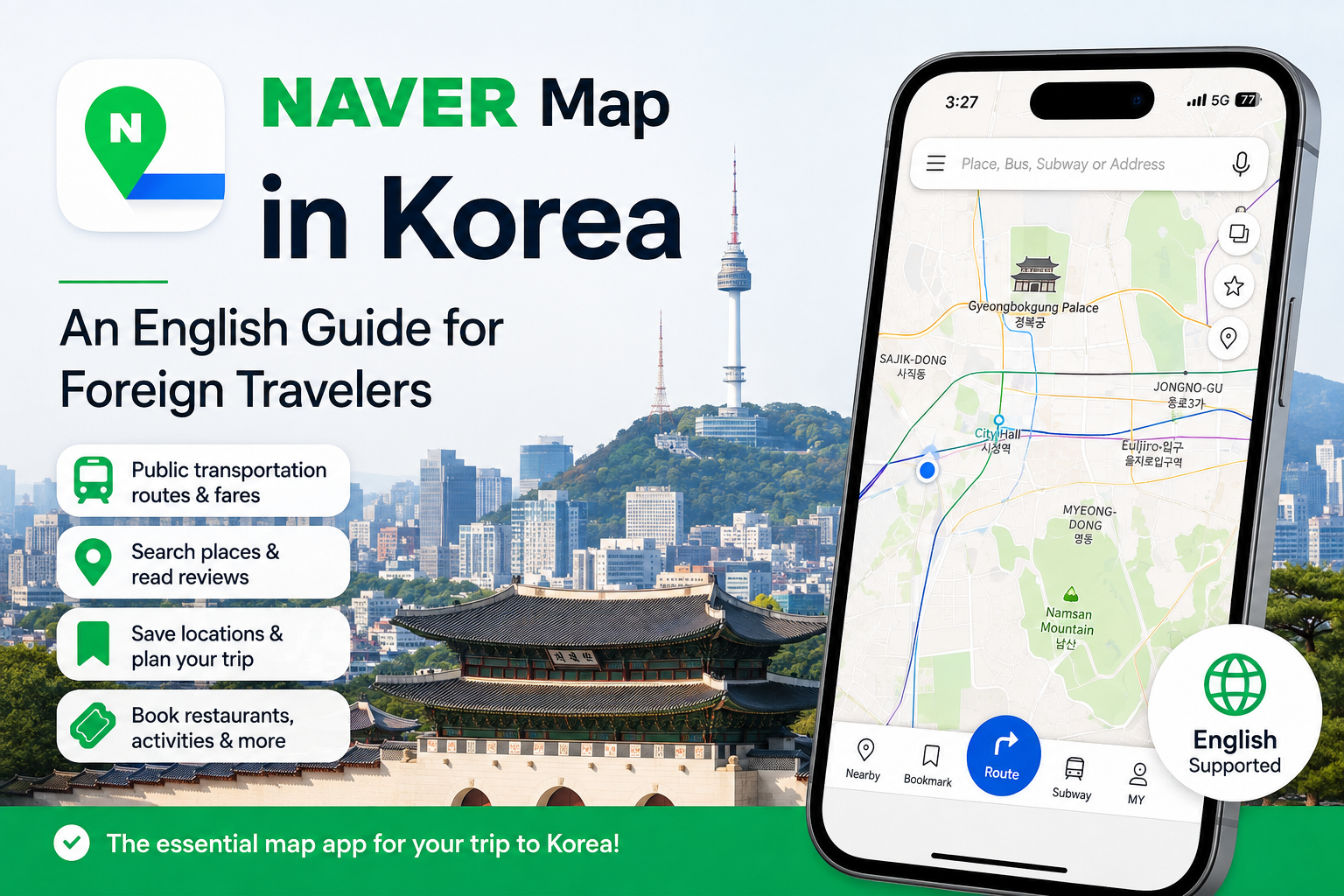
Before traveling to Korea, install NAVER Map alongside Google Maps. NAVER Map provides English-language maps and navigation, detailed public transportation routes, expected fares, local business information, translated reviews, bookmarks, and selected booking options. You can use the basic map and route features even if you do not speak Korean, although some place names and advanced services may still require extra steps.

Download : NAVER MAP (App Store/Google Play : 'Naver Maps, Navigation')
At a Glance
Item
Details
App name
NAVER Maps, Navigation
Best for
Local search, public transportation, walking routes, restaurants, attractions and trip planning in Korea
Not always required for basic searches; required for bookmarks and certain booking functions
Recommended timing
Install and test it before arriving in Korea
Main limitation
Some place names, reviews or booking processes may still appear partly in Korean
Last checked
August 24, 2026
Why NAVER Map Is Useful in Korea
NAVER Map combines several tools that are useful for independent travelers.
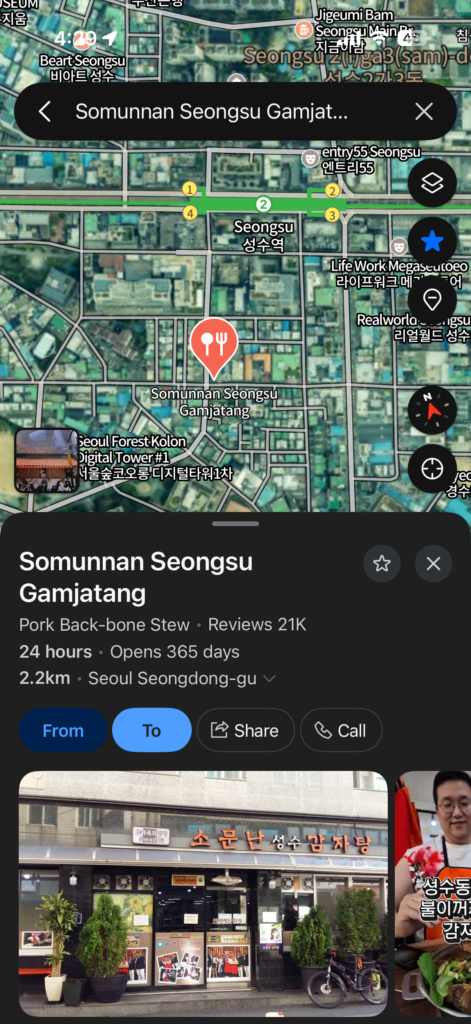
You can search for places, addresses, buses, and subway stations from one search bar. You can also check public transportation routes, estimated travel times, real-time arrival information, street views, aerial views, opening hours, and saved locations.
NAVER’s official app description includes public transportation directions, real-time departure and arrival information, boarding and alighting notifications, street and aerial views, bookmarks, opening hours, and booking services.
For travelers, the most useful features are usually:
Finding the correct entrance or branch of a restaurant
Checking which subway exit to use
Comparing subway and bus routes
Seeing how much walking is included in a route
Checking business hours and recent photographs
Saving restaurants, cafés, and attractions in separate lists
Finding places that may be difficult to locate using only an English name
Viewing selected restaurants, activities, tours, and tickets that can be booked online
NAVER also promotes translated reviews, route guidance, expected fares, and booking options for international travelers through its BE LOCAL service.
NAVER Map is not perfect. Some business names, menus, reviews, and booking screens may still appear partly in Korean. However, the main map and navigation functions can be displayed in English, making the app much easier to use than many first-time visitors expect.
How to Download NAVER Map and Switch It to English
Search for the following app in the Apple App Store or Google Play: NAVER Maps, Navigation
Before installing it, check that the developer is listed as: NAVER Corp.
Avoid downloading an unofficial app with a similar name.
How to Change the Language on Android
After opening NAVER Map:
Tap the MY profile icon near the search bar.
Tap the Settings gear icon.
Select Language.
Choose English.
NAVER’s official help page lists Korean, English, Simplified Chinese, and Japanese as the available app languages.
How to Change the Language on an iPhone
On iOS, start with the following steps:
Open NAVER Map.
Tap the MY profile icon.
Tap the Settings gear icon.
Select Language.
Choose English in the iPhone’s preferred language settings.
You can also open your iPhone settings directly and go to:
Settings → NAVER Map → Preferred Language → English
If the Preferred Language menu does not appear, add English under:
Settings → General → Language & Region
The exact wording or position of a menu may change slightly after an app update.
Allow Location Access
NAVER Map needs access to your location if you want directions from where you are currently standing.
Choose the option that allows location access while using the app. You do not need to allow permanent location access unless you personally want background navigation features.
NAVER states that location access is used to identify the user’s position when searching for directions or using navigation.
How to Search for Places on NAVER Map
Start by typing the English name of the place into the search bar.
For example:
Gyeongbokgung Palace
Seoul Station
Gwangjang Market
Myeongdong Cathedral
Bukchon Hanok Village
NAVER Map’s main search bar can search for locations, buses, subway stations, and other local information.
What to Do When the English Name Does Not Work
Major tourist attractions are often easy to find in English. Smaller restaurants, cafés, shops, and recently opened businesses can be more difficult.
When the English name does not produce the correct result, search using the Korean name.
Here is the easiest method:
Find the business on its official website, Instagram profile, hotel booking page, or another reliable source.
Copy the Korean business name.
Paste the Korean name into the NAVER Map search bar.
Compare the address, photographs, phone number, and nearby station before selecting the result.
For example, if searching for a restaurant in English does not work, copying its Korean name directly into NAVER Map will often give you a more precise search result.
You do not need to know how to type Korean. Copying and pasting the name is enough.
How to Get Directions with NAVER Map
Once you have selected a destination, tap the directions button.
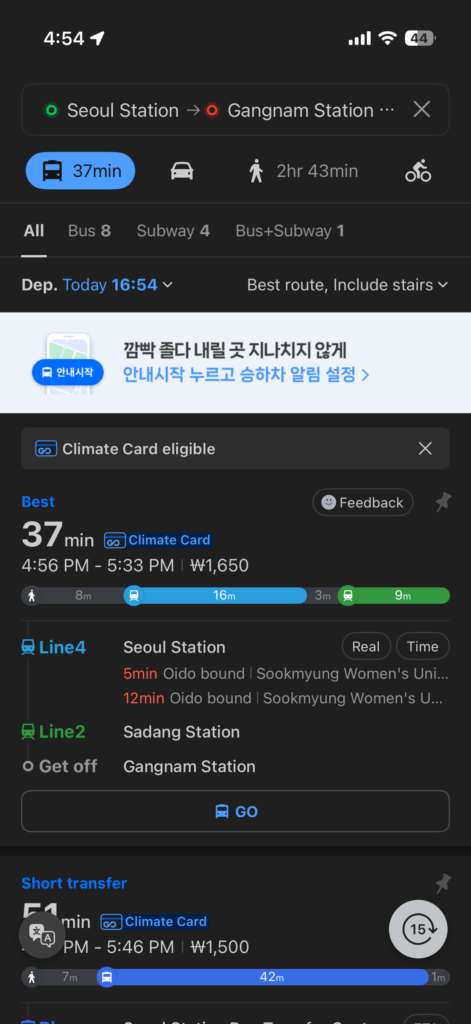
Enter your starting point or use your current location. Depending on the route and app version, NAVER Map may show options for public transportation, walking, driving, or navigation.
Using Public Transportation Directions
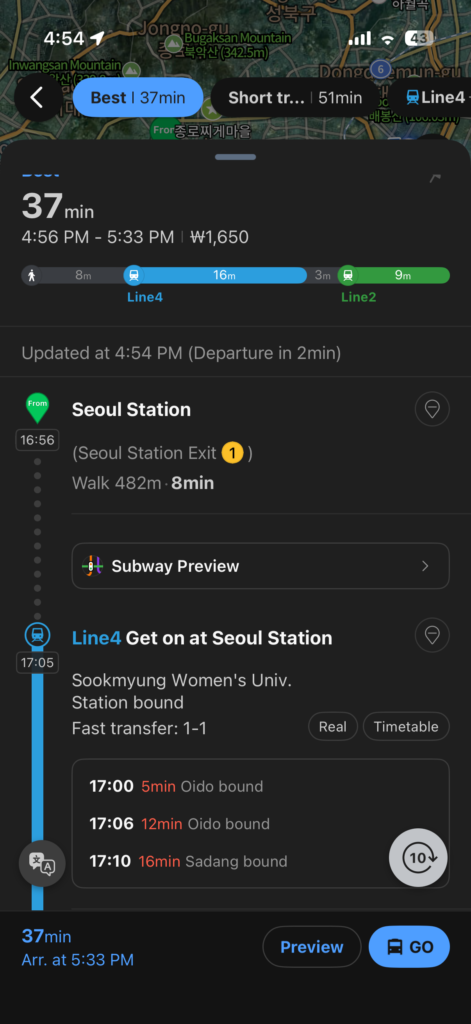
For a subway or bus journey, check:
Total travel time
Number of transfers
Estimated fare
Walking time
Departure and arrival stops
Subway line and direction
Bus number
Estimated bus or train arrival time
Recommended subway exit
Notifications for when to board or get off
NAVER Map officially provides public transportation directions for multiple modes of travel, real-time departure and arrival information, and boarding and alighting notifications.
How to Check Restaurants, Cafés, and Attractions
NAVER Map is useful for more than directions.
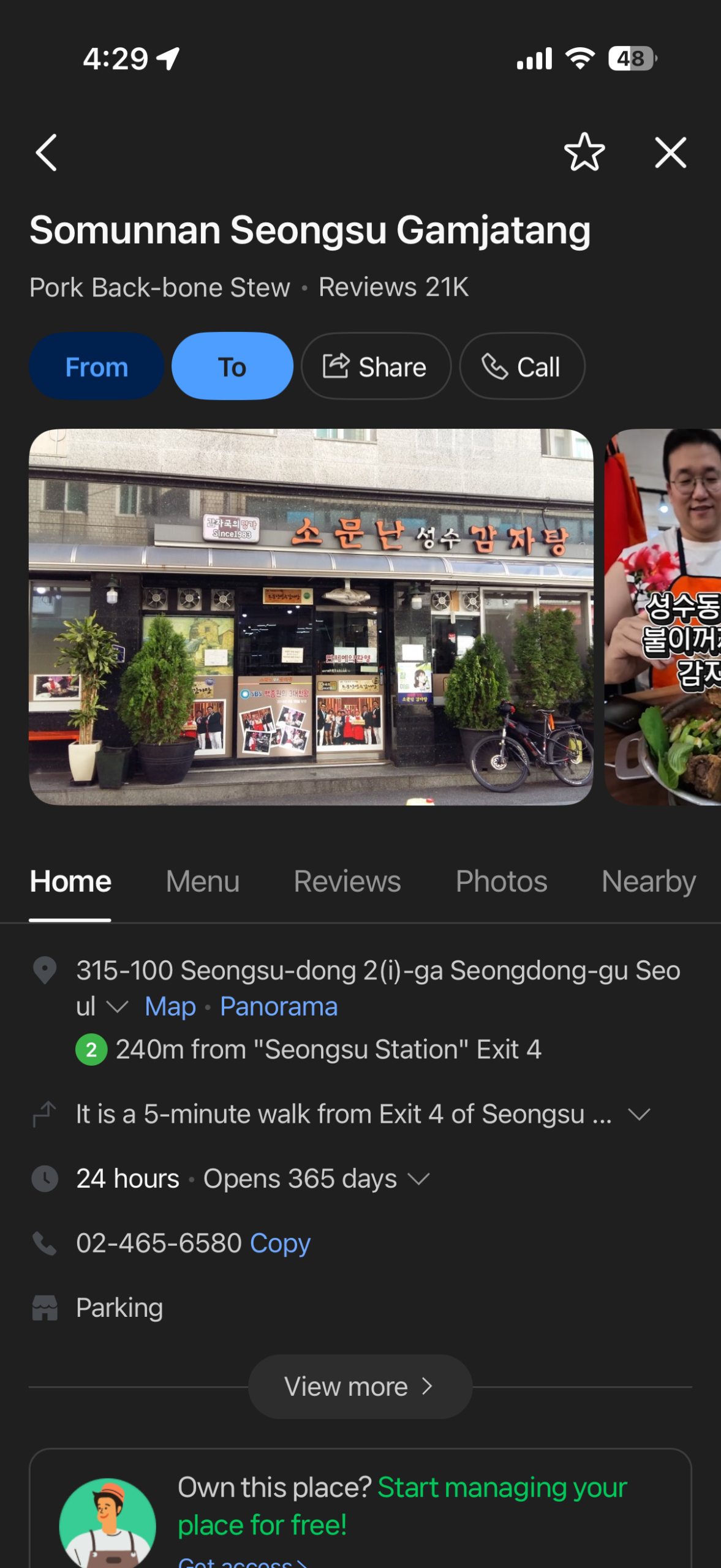
A place page may include:
Opening and closing hours
Break times
Regular closing days
Address and phone number
Menus or price information
Photographs and video clips
Visitor reviews
Booking or ordering buttons
Nearby places
Official announcements from the business
NAVER’s app description specifically mentions opening hours, saved restaurants and attractions, reviews, and bookings. Its BE LOCAL page also promotes photographs, videos, and reviews translated for international travelers.
What Is BE LOCAL?
BE LOCAL is a NAVER campaign designed to introduce international travelers to local places, activities, tours, tickets, and promotional offers in Korea.
The BE LOCAL page presents NAVER Map’s route, review, and booking functions together with temporary coupons and travel benefits.
You may find:
Discount coupons
Local activities
Tour and ticket offers
Korean brand promotions
Seasonal campaigns
Destination recommendations
These promotions can change or expire.
Always check:
The valid dates
The eligible branch or location
Whether advance booking is required
Whether the benefit is limited in quantity
Whether identification is required
Whether the coupon can be combined with another promotion
Do not build your entire itinerary around a promotion until you have confirmed the current conditions.
You do not need to choose only one app. The most practical approach is to use both.
Situation
Recommended Approach
Finding detailed local place information in Korea
Start with NAVER Map
Checking public transportation routes in Korea
Check NAVER Map first
Searching for a small restaurant or café
Try NAVER Map, especially with the Korean name
Keeping an existing international travel list
Continue using Google Maps if it is already organized
An English place name does not appear
Find the Korean name and paste it into NAVER Map
One app gives an unclear route
Compare the same trip in both apps
Checking recent Korean reviews and local photographs
Use NAVER Map
Confirming time-sensitive transportation information
Check the relevant operator’s official information
Google Maps is not useless in Korea. It can still help with general trip organization, internationally recognized attractions, and places that you have already saved.
However, NAVER Map is worth adding because it is designed around Korean local information and everyday travel needs.
My recommendation is simple:
Keep Google Maps, but install NAVER Map before your Korea trip.
FAQs
Does NAVER Map Work in English?
Yes.
NAVER Map officially supports English maps and English navigation. It also supports Korean, Japanese, and Simplified Chinese. Some business names, reviews, menus, and advanced service pages may still appear partly in Korean.
Is NAVER Map Free?
Yes. The app is free to download.
Transportation fares, tickets, reservations, activities, and other paid services shown inside the app are charged separately.
Do I Need a Korean Phone Number?
A Korean phone number is not listed as a requirement for downloading NAVER Map.
However, creating a NAVER account and using booking, payment, or identity-related services may require mobile verification or additional information. NAVER’s account registration process includes mobile-phone verification, while the exact requirements can depend on the service being used.
Can I Search for Places in English?
Yes, especially for well-known tourist attractions, stations, hotels, and major businesses.
If the result does not appear, search with the Korean name. Copying and pasting Korean text is usually easier and more reliable than trying several English spellings.
Can Foreign Travelers Make Reservations?
Selected restaurants, activities, tours, tickets, and other products can be booked through NAVER.
A NAVER account is generally required for the booking process, and payment or identity requirements vary by product. Check the conditions before making payment.
Can I Use NAVER Map Outside Korea?
You can install the app and plan your Korean itinerary before your trip.
Search for your hotel, airport, stations, restaurants, and attractions in advance. Saving key locations before departure will make the app easier to use after you arrive.
Should I Delete Google Maps?
No.
Keep both apps. Use NAVER Map for detailed local searches and transportation in Korea, while keeping Google Maps for your existing international travel lists and as a backup.
Final Tips Before Your Korea Trip
Install NAVER Map before boarding your flight.
Switch the app to English and practice these three actions:
Search for your hotel.
Find a public transportation route from the airport.
Save three places you plan to visit.
Also save the Korean name and address of your hotel. This can help when using a taxi or asking someone for directions.
NAVER Map may feel unfamiliar for the first few minutes, but you do not need to learn every feature. Start with search, directions, and bookmarks. Those three tools will handle most situations during your trip.
Official Sources
NAVER Map official Apple App Store listing.
NAVER Map official Google Play listing.
NAVER Map official language-setting guide.
NAVER BE LOCAL campaign for international travelers.
NAVER Booking help for international travelers.
Information may change after publication. Check the latest route, fare, opening hours, booking, and payment conditions before traveling.
Manage Consent
To provide the best experiences, we use technologies like cookies to store and/or access device information. Consenting to these technologies will allow us to process data such as browsing behavior or unique IDs on this site. Not consenting or withdrawing consent, may adversely affect certain features and functions.
Functional
Always active
The technical storage or access is strictly necessary for the legitimate purpose of enabling the use of a specific service explicitly requested by the subscriber or user, or for the sole purpose of carrying out the transmission of a communication over an electronic communications network.
Preferences
The technical storage or access is necessary for the legitimate purpose of storing preferences that are not requested by the subscriber or user.
Statistics
The technical storage or access that is used exclusively for statistical purposes.The technical storage or access that is used exclusively for anonymous statistical purposes. Without a subpoena, voluntary compliance on the part of your Internet Service Provider, or additional records from a third party, information stored or retrieved for this purpose alone cannot usually be used to identify you.
Marketing
The technical storage or access is required to create user profiles to send advertising, or to track the user on a website or across several websites for similar marketing purposes.